
Call & SMS insights for freelancers
Know how much time every client takes on the phone.
Syncfony turns your call log and messages into clear reports per contact and per client. Track talk time, keep a dated record of every call and export it for your timesheets, invoices or bookkeeping. Everything is analyzed right on your phone.
- Free to start
- On-device analysis
- No account needed
- CSV export
- 06:5201 Oct Outgoing
- 07:1102 Oct Incoming
- 09:0003 Oct Outgoing
- 04:1405 Oct Incoming
- 05:0506 Oct Incoming
- 22:44+ 5 more calls
your timesheet
Features
Your phone time, in plain numbers.
Syncfony counts calls, messages and talk time per contact and per group — so you always know where your phone time goes, and which client it belongs to.
01 / groups
Groups for clients and projects
Group contacts by client, project or team — or keep family and friends together. See combined calls, messages and talk time, plus the most active people.
02 / contacts
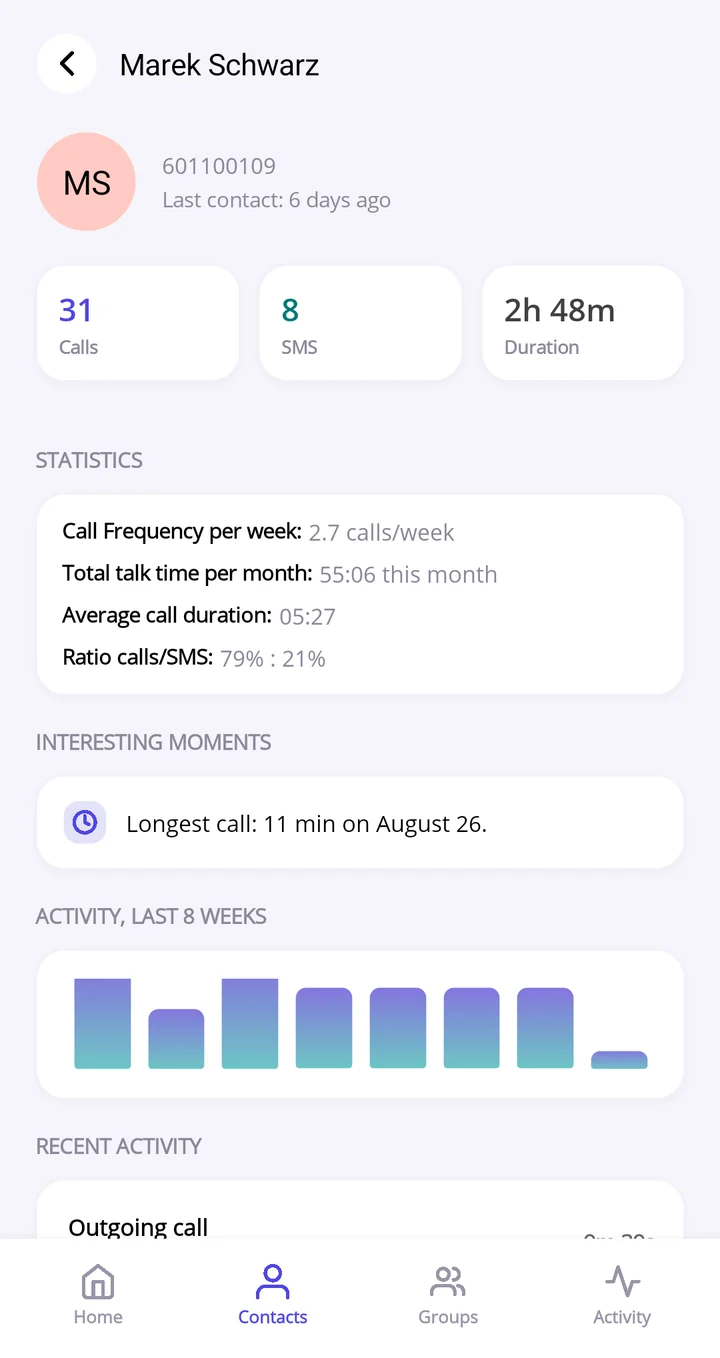
Insights for every contact
Calls per week, monthly talk time, average call length, calls/SMS ratio, your longest call and an activity chart for the last 4 weeks (8 weeks with Premium).
03 / this_week
Your week at a glance
Total calls, messages and talk time for the week, a weekly activity chart and your most active contacts.
04 / activity_log
A dated record of every call
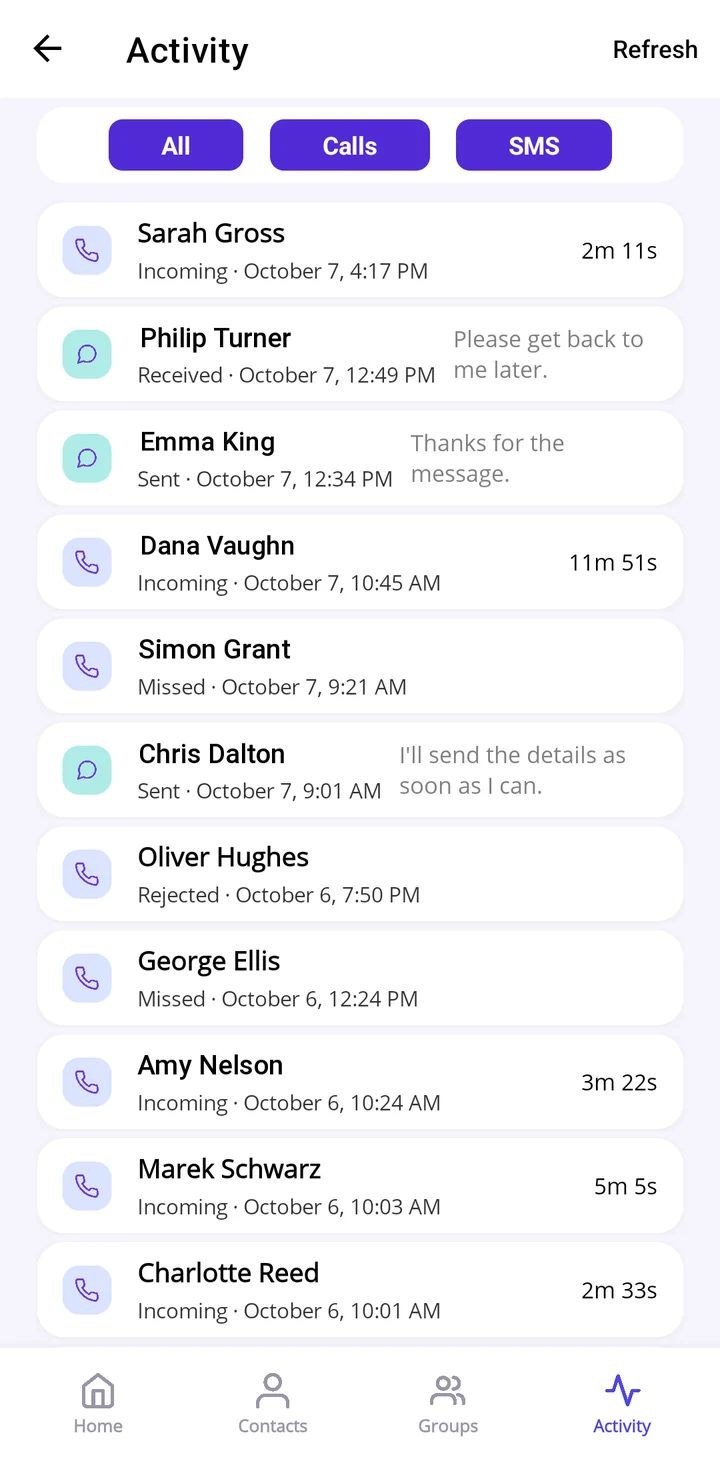
Every call and message in one place, with exact date, time and duration. Filter by calls or SMS, search and sort.
05 / export.csv Premium
Export to CSV
Calls, messages, contacts and groups as CSV files for timesheets, invoices and bookkeeping. What’s in the export
06 / no_account
No account, dark mode
Install and go — no sign-up needed. Syncfony looks just as clear in light and dark themes.
From call log to timesheet
How a phone call becomes a billable hour
01 / contacts
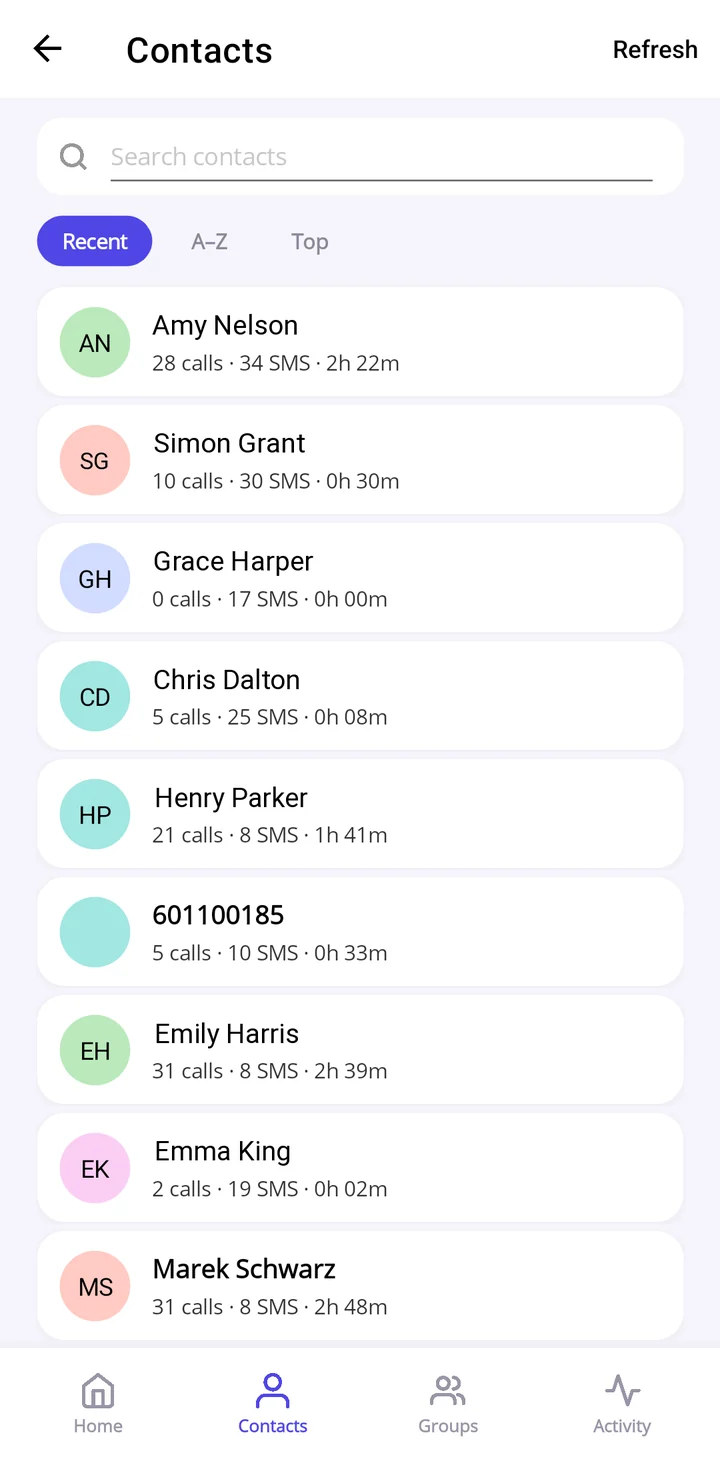
See where your phone time goes
Every contact with their calls, messages and total talk time. Sort by most recent, A–Z or the people you talk to most.
talk time for everyone,
at a glance
02 / groups
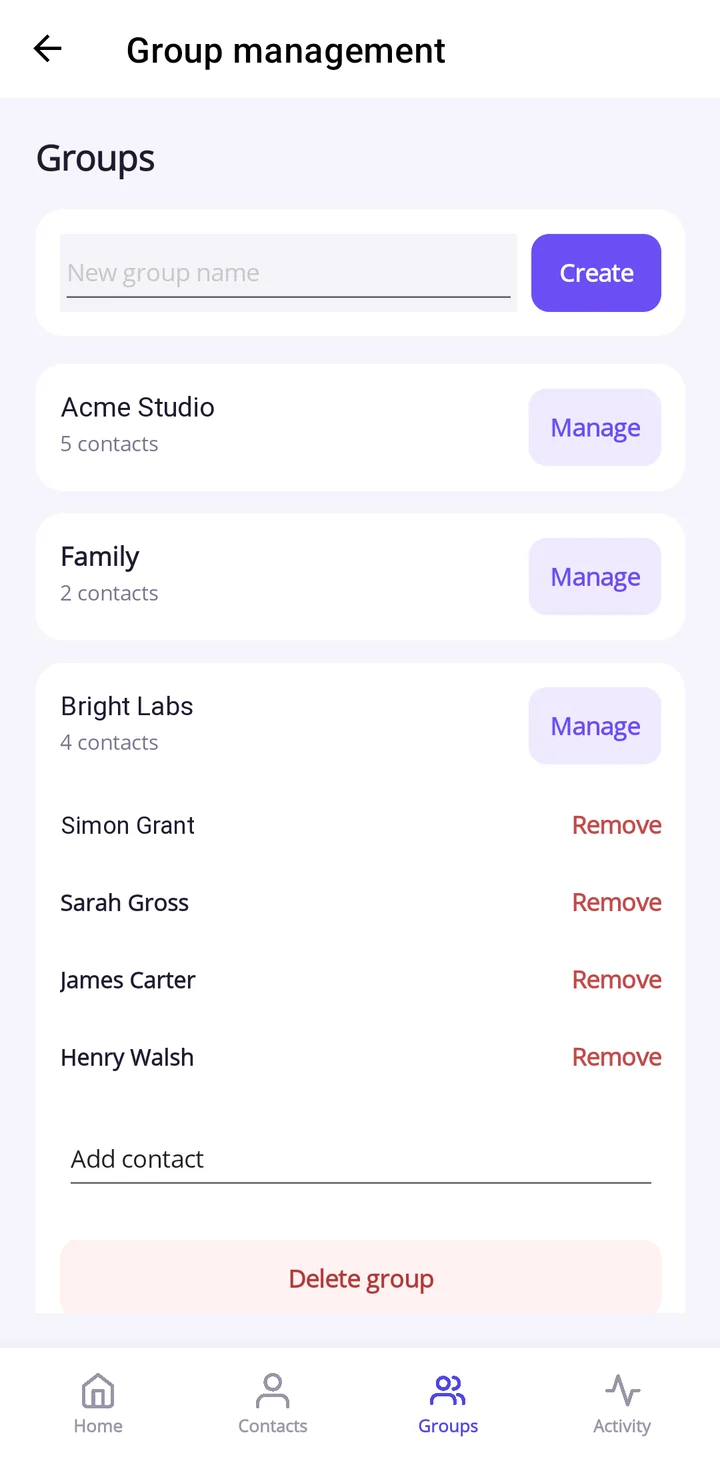
Make a group for each client
Add everyone you deal with at a client — or a whole project team — to one group. The free version includes one group, Premium gives you as many as you need — one for each client, and one for the family.
one group
per client
03 / group_summary
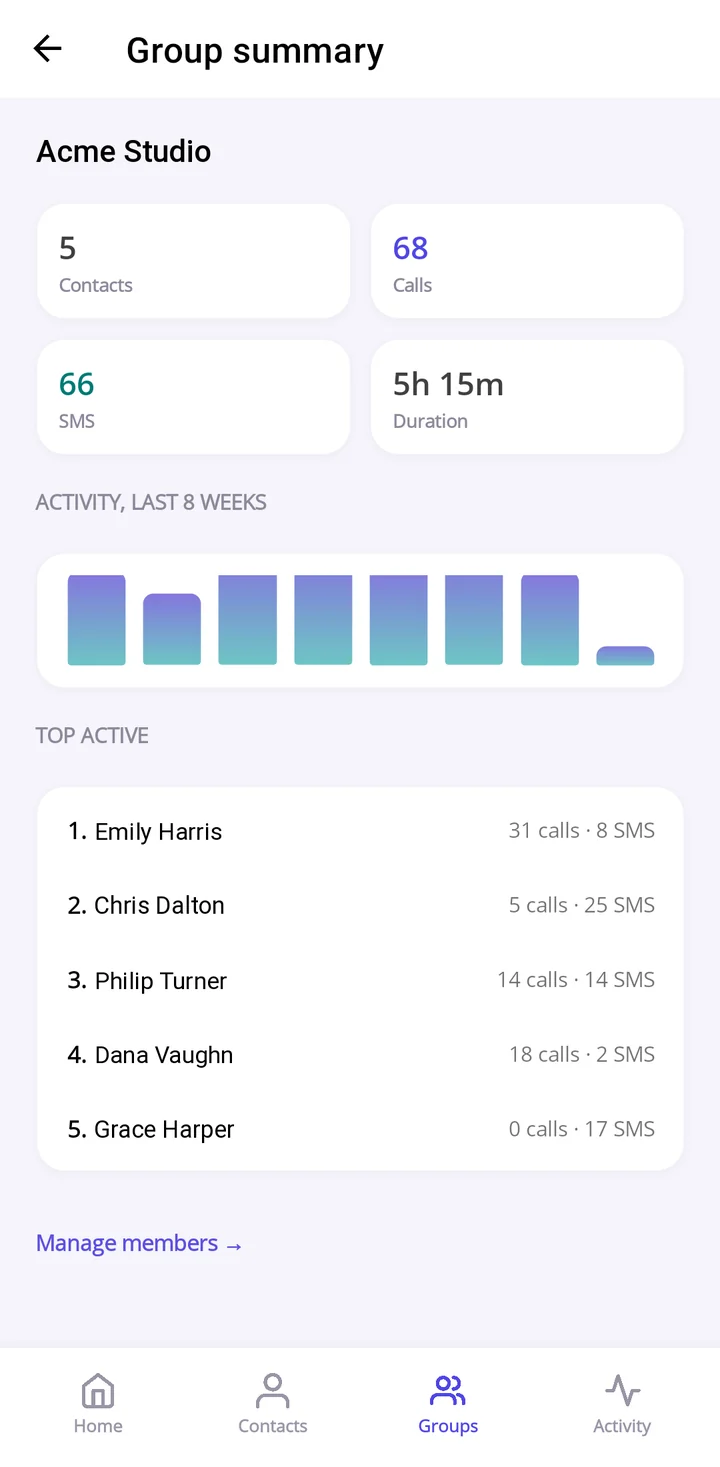
Get the total for each client
Calls, messages and total duration for the whole group, an activity chart (last 4 weeks, or 8 with Premium) and the most active people at the client.
Acme Studio: 5h 15m.
That’s your number.
04 / activity_log
Keep a dated record, export it
Every call and message with exact date, time and duration. With Premium, export it to CSV and drop it into your timesheet, invoice or bookkeeping tool. See what’s in the export
every call,
dated to the minute
Who it’s for
Made for people who bill or report their time
Freelancers & consultants
Track talk time per client, fill in timesheets faster and back up your invoices with a dated record of every call.
Small business owners
Group clients, suppliers and your team, see who takes the most time and hand a clean CSV to your accountant.
Family & friends
Not just for work. Put family and friends in a group of their own and see how often you talk and for how long.
CSV export · Premium
Export your calls and messages for timesheets, invoices and bookkeeping
Syncfony Premium exports your data to CSV files that open in Excel, Google Sheets or Numbers and import into most time-tracking, invoicing and accounting tools. The files are created on your phone when you ask for them, and you choose where to save or share them.
Calls
One row per call.
Datedate and timePhoneNumberContactNameempty if not savedDurationSeconds0 for missedTypeIncoming, Outgoing, Missed, Rejected
Messages
One row per SMS, including the message text.
Datedate and timePhoneNumberTypeInbox (received) or SentIsRead1 or 0Bodymessage text
Contacts
Totals for each contact.
NamePhone numberTotal callsTotal SMSTotal durationHH:MM:SS
Groups
Totals for each group — handy for clients.
Group nameContacts countTotal calls,Total SMSTotal durationHH:MM:SSTop active contact,Contacts
Sample: calls file
Date,PhoneNumber,ContactName,DurationSeconds,Type
"2026-10-26 10:23:00","+44 20 7946 0123","Sarah Gross",694,"Incoming"
"2026-10-25 11:40:00","+44 20 7946 0456","Philip Turner",521,"Outgoing"
"2026-10-25 12:20:00","+44 20 7946 0234","Dana Vaughn",0,"Missed"
"2026-10-24 09:05:00","+44 20 7946 0567","",312,"Incoming"
UTF-8, comma-separated, with a header row. Accented names display correctly in Excel. Files are named by type and export time, e.g. calls_20261031_115102.csv.
Tips for client reporting
- Talk time per client: put the client’s contacts into a group — the groups file already has their total duration. Or filter the calls file and add up
DurationSeconds, then divide by 3,600 for hours. - Excel / Google Sheets: import the file with comma as the separator and keep the phone number column as text, so the leading + and zeros stay.
- A dated record: every row has the exact date and time, so you can show when you called or messaged a client.
- Handle with care: the messages file contains the text of your SMS. Share it only with people who should see it.
Free & Premium
Start free. Upgrade when you need more.
Free
Free to download and use.
- All statistics for the last 30 days (4-week charts)
- One group
- Weekly overview, contact insights and activity log
- No account needed, dark mode
Premium
Everything in Free, plus:
- CSV export
- Unlimited history, full 8-week charts
- Unlimited groups
Yearly subscription or one-time lifetime purchase, in the app via Google Play.
Private by design
Your call log stays on your phone
Syncfony analyzes your calls and messages on your device. Your call log and messages are not uploaded for analysis, and you don’t need an account.
- On-device analysis. Statistics are calculated right on your phone.
- Call log is required, SMS is optional. Grant SMS access only if you want messages in your statistics.
- Clear purpose. These permissions are used only to show your statistics in the app.
How it works
Up and running in a minute
Install Syncfony
Download it for free from Google Play. No account or sign-up.
Grant access
Allow call log access so the app can count calls and talk time. Add SMS access if you want messages included.
Group your clients
Your stats appear right away. Create a group for a client and see their total talk time.
FAQ
Questions & answers
Is Syncfony free?
Yes. Syncfony is free to download and use, with all statistics for the last 30 days and one group. Syncfony Premium adds CSV export, unlimited history (including the full 8-week activity charts) and unlimited groups.
How does Premium work?
Premium is available as a yearly subscription or a one-time lifetime purchase. Subscriptions renew automatically unless cancelled at least 24 hours before the end of the current period. You can manage or cancel your subscription in Google Play.
Can I use Syncfony for timesheets and invoicing?
Yes. Group your contacts by client to see the total talk time for each one, and with Premium export your calls and messages to CSV for your timesheet, invoicing or bookkeeping tool.
What’s in the CSV export?
Four CSV files: calls, messages (including the message text), contacts and groups. See all columns and a sample.
Are my calls and messages uploaded anywhere?
No. The analysis happens on your phone and your call log and messages are not uploaded for analysis. No account is needed.
Why does the app need call log and SMS permissions?
Call log permission is required to count your calls and talk time. SMS permission is optional; grant it to include your messages in the statistics. Contacts permission lets the app show names instead of phone numbers. These permissions are used only to show your statistics in the app.
Know where your phone time goes.
Call & SMS stats per contact and group. See talk time for every client. Free on Google Play.